Understanding Vector Illustration Sets: Evaluating the Boys Riding Bike Collection for Professional Projects
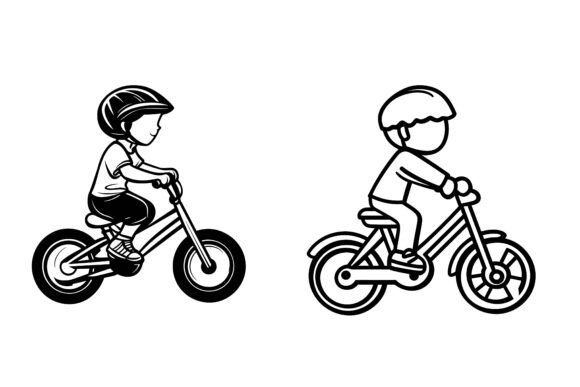
When a project calls for a lively, youthful energy—whether it’s an educational app, a children’s event flyer, or a safety poster—an illustration set featuring boys riding bikes can communicate motion, joy, and outdoor activity in a single glance. Among the many options available, one specialized offering arrives as an organized Set of Boys Riding Bike bundled in AI, EPS, and JPG formats. It’s built on the promise of clean layers, cross‑platform compatibility, and user‑editable elements. But before adding it to your toolbox, it helps to understand how it fits into the wider spectrum of illustration resources, where it shines, and what tradeoffs might matter for your specific needs.
What Exactly Is the Boys Riding Bike Illustration Set?
At its core, this is a vector‑based illustration package that includes the original Adobe Illustrator file, a universal EPS copy, and a high‑resolution JPG preview. The artwork centers around one or more stylized scenes of boys riding bicycles, with each element thoughtfully placed on separate, labeled layers. The designer created it for both Mac and Windows environments, so you won’t hit platform‑specific snags. The file structure is deliberately neat—groups are named logically, strokes are outlined where necessary, and gradients remain editable. For anyone who has opened a messy stock file only to find disorganized layers and broken clipping masks, this kind of forethought saves real production time.
Comparing File Formats: Why AI, EPS, and JPG in One Package Matters
Many stock illustration sites offer a single format—often just a flat PNG or a low‑resolution JPG. Here, the combination of AI, EPS, and JPG gives you flexibility across workflows. The AI file is the native source; you can tweak poses, adjust line weights, or completely recolor the entire scene directly in Adobe Illustrator. The EPS serves as a universal backup that opens in older Illustrator versions, CorelDRAW, Affinity Designer, and many other vector tools. Meanwhile, the JPG acts as a quick reference or placeholder that you can drop into a presentation without needing vector software.
If you’ve ever compared a purely raster set against a vector alternative, you already know the limitations: scaling a PNG beyond its original size introduces pixelation, and recoloring a grouped JPG is a chore. A vector set sidesteps both problems. The Boys Riding Bike collection leans into this advantage fully—every component, from the spokes on the wheels to the expressions on the riders, remains crisp at stamp size or billboard scale.
When Editability and Layer Structure Become Decision Pointers
The claim that you can “edit it, change colors and modify the icon so easily” isn’t just marketing language—it reflects a design decision that separates generic downloads from truly production‑ready assets. With well‑organized layers, you can isolate a single character and reuse it as an app icon, pull out the bike alone for a cycling safety infographic, or swap the background to match a brand palette in minutes. This level of control matters most when consistency across multiple materials is critical. Instead of hiring a custom illustrator to redraw elements each time, you adjust the source files precisely how you need them.
However, editability isn’t free. It assumes you have basic familiarity with vector software. If your team works strictly in Canva or PowerPoint and only imports raster graphics, the AI and EPS files might be underused. In that scenario, the included JPG might suffice, but you lose the deep customization that makes vector sets valuable. It’s a classic fit‑versus‑skill tradeoff: the set rewards those comfortable with paths and bezier curves and may frustrate those who expected a plug‑and‑play drag‑and‑drop experience without any learning curve.
Strengths and Real‑World Use Cases: Print, Web, Symbols, and Beyond
The Boys Riding Bike illustration set is explicitly tagged as suitable for print, web, symbols, apps, and infographics. That list isn’t unrealistic. A few practical examples:
- Educational Materials: A teacher creating a worksheet on road safety can place the illustration into the handout, resize it without loss, and even adjust the bike color to match the school’s identity.
- Mobile App Onboarding: An app focused on family activities might use a simplified, recolored version of a rider as a welcome screen illustration, maintaining vector sharpness across retina and high‑DPI displays.
- Wayfinding Signage: In a park or recreational area, the illustration can become a pictogram for bike trails, enlarged to large‑format printing while keeping every detail sharp.
- Infographics: Data about cycling habits becomes more engaging when a stylized boy on a bike replaces sterile bar charts; the editable nature lets you change the scene to reflect different demographics or regions.
The consistency of detail across the set—perfection in the curve of a tire, the subtle shadow under a character—reduces the patchwork look that sometimes creeps in when mixing assets from multiple sources. This cohesion is a quiet strength when you’re assembling branded collateral that needs to feel unified.
Where This Set Fits Best and Recognizing the Limits
This particular illustration style tends to land in a friendly, approachable, slightly stylized aesthetic—common in children’s content, light‑hearted branding, and nonprofit outreach. If your project aligns with that tone, the Boys Riding Bike set can be a lean, one‑stop solution. It works especially well when:
- You need a ready‑made scene that you can adapt rather than commissioning an artist from scratch.
- Your deliverables span multiple media and require both vector and raster versions.
- You value organized source files that respect your time when making client revisions.
On the other hand, no single illustration pack covers every need. The style may be too polished or “cartoon‑neat” for a gritty documentary project or an avant‑garde art magazine. If you require photorealistic renderings of specific bike models or highly individualized character portraits, a stock photo or a custom photography shoot would be a more precise fit. Similarly, if your brand already has established custom illustrations, grafting an external set onto existing assets could create visual mismatches, even with recoloring.
Decision Factors: What to Evaluate Before Choosing an Illustration Resource
When you line up different vector sets side by side, here are the criteria that often separate a solid investment from a regretted purchase:
- Format breadth: Does the set provide native editable files (AI, EPS, SVG) or only flattened rasters? The Boys Riding Bike set includes both source vectors and a JPG, which checks a lot of practical boxes.
- Layer organization: Open the preview file and examine the layer panel. If every object is named “Layer 1” and grouped arbitrarily, customization will be more pain than it’s worth. Organized structure, as advertised here, is worth its weight in billable hours.
- Cross‑platform reliability: Files built specifically for Mac and Windows avoid font‑substitution nightmares and corrupted gradients. This is a small but meaningful detail.
- Licensing scope: Check whether the license covers apps, merchandise, and unlimited digital impressions, or if there are print‑run limits. Most sets like this are meant for broad use, but it’s always wise to confirm.
- Stylistic versatility: Does the set offer enough composition variety for your narrative? If you need a sequence showing different bicycle activities, a single scene might fall short. In such cases, you might pair this set with complementary action‑oriented packs—just be mindful of maintaining overall cohesion.
Comparing to Alternative Approaches: Stock Photos, Custom Work, and Other Vector Sources
A custom illustrator can bring a completely unique vision, but at a significantly higher cost and timeline. That path makes sense when the illustration is central to a brand’s identity. Stock photos of children biking provide realism but often lack the flexibility to be recolored or resized without degradation. They also come with model release constraints, especially for commercial usage. Other vector illustration marketplaces offer an enormous variety, but the quality of layer organization and detail varies wildly. Many budget packs download as a single flattened group, making even the simplest color change an exercise in frustration.
In this landscape, a neatly prepared, multi‑format set that arrives with attention to detail and editability offers a middle ground. It’s not the cheapest single‑file option, but the time saved by not having to untangle messy artwork can easily justify the choice. The Boys Riding Bike illustration specifically positions itself as a production asset rather than just a pretty picture. The emphasis on perfection in details and consistency suggests it was built for people who know the difference between a showpiece and a workable toolkit.
Practical Tips for Integrating the Set into Your Workflow
Once you decide to use such a set, a few practices help you get the most from it. First, open the AI file and immediately save it under a new name to preserve the original. Spend a few minutes reviewing the layer structure; you might discover hidden alternate poses or unused background elements that can be repurposed. When recoloring, use global swatches if provided, or create your own color palette to quickly test brand alignment. If you’re handing the file to another designer, annotate any custom changes you made on a locked layer so the next person understands what was modified.
For projects that stretch across web and print, vector art’s resolution independence is a clear win. You can export the same artwork at 72 DPI for a website hero banner and at 300 DPI for a poster, both without resampling artifacts. If you need a quick inline graphic for an email newsletter, the JPG placeholder comes in handy, though you’ll typically want to rasterize the vector at the exact dimensions you need rather than relying solely on the pre‑rendered JPG.
When a Ready‑Made Illustration Set Is the Smarter Move
There’s a time to build from scratch and a time to adapt. If you’re operating under tight deadlines, limited budgets, or you simply need a proven visual that can be twisted to fit a dozen contexts, the Boys Riding Bike set represents the kind of resource that can fill that gap. Its organized nature and robust format support mean you aren’t locked into a single look. With modest vector editing skills, you can rotate figures, swap helmet colors, and even combine the riders with other backgrounds to create entirely new compositions.
That said, the editorial choice to include a friendly welcome message—“Hello Welcome to our Special AI EPS Collections”—hints at a human‑curated approach rather than an algorithmically generated dump. For discerning buyers who have been burned by hastily assembled icon packs, that personal touch can signal a higher standard of craftsmanship.
Balancing Immediate Needs with Long‑Term Flexibility
In the end, evaluating any illustration asset comes down to how it serves your current project while leaving room for unexpected future uses. A boys riding bike graphic might initially feel like a niche need, but its components—active children, bicycles, outdoor elements—have broad applications across fitness, education, family, and transportation themes. The key is that the underlying files give you ownership over how those elements evolve. The set’s promise of easy modification, neat layer structure, and cross‑platform readiness transforms a static image into a dynamic resource that can grow with your creative demands. By weighing those capabilities against the specific constraints of your project, you can make a confident choice without relying on exaggerated claims.