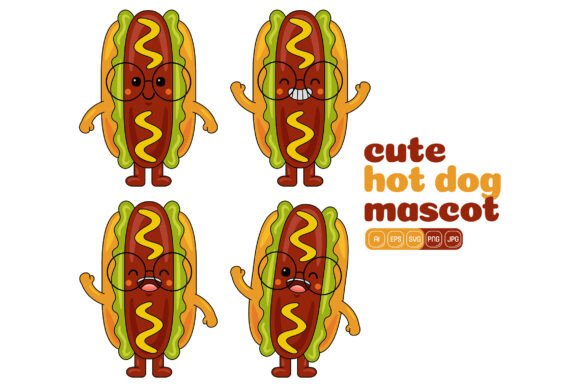
Building Brand Personality With the Cute Hot Dog Mascot Vector Pack 01
Visual identity shapes how audiences connect with a brand, and few elements communicate warmth and approachability quite like a well-designed mascot. The Cute Hot Dog Mascot Vector Pack 01 offers a collection of illustrations that tap into this principle, presenting a recognizable food item transformed into a character full of expression and versatility. Whether you are designing for digital platforms, printed materials, or motion graphics, understanding what makes this type of asset valuable can elevate your creative projects considerably.
Why Food Mascots Resonate Across Industries
Food-based characters have a long history in advertising and visual communication, from animated cereal boxes to fast-food icons. A hot dog mascot layers this tradition with specific connotations: casual comfort, nostalgia, celebration, and a touch of whimsy. These associations transfer to any brand or project that adopts the imagery, making the vector pack useful far beyond food-related businesses. A tech startup might use a playful hot dog character to humanize an app interface, while an event organizer could place the same mascot on festival banners to suggest fun and accessibility.
What distinguishes vector-based mascots from static clip art is the capacity for modification. The Cute Hot Dog Mascot Vector Pack 01 contains one hundred distinct illustrations, each presenting the character in different poses, with varying accessories, and across multiple scenarios. This breadth means a designer can maintain visual consistency while adapting the mascot to different contexts — holding a sign for a sale announcement, waving for a welcome page, or lounging next to a headline about weekend specials. The flat design style further ensures the illustrations read clearly at both small and large scales, an essential consideration when assets must function on everything from mobile screens to storefront windows.
Understanding the File Ecosystem and Technical Specifications
Anyone who has worked with digital illustrations knows that receiving a single file format can limit what you can accomplish. The vector pack addresses this by delivering Ai, EPS, SVG, PDF, JPG, and PNG formats in one bundle. Each serves a distinct purpose in a creative workflow.
- Ai and EPS files provide native and universal vector editing capabilities, preserving layers and allowing deep customization in Adobe Illustrator or similar software.
- SVG format supports web integration, enabling responsive graphics that scale cleanly across devices without pixelation.
- PDF vectors offer a bridge between design and print production, maintaining crisp output for physical materials.
- JPG and PNG files deliver high-resolution raster versions at 3000 by 3000 pixels, with the PNG supplying transparent backgrounds ideal for overlay work.
Understanding when to use each format prevents the frustration of opening an illustration only to find it incompatible with your tools. A social media manager building Instagram stories might rely on PNG files for quick placement, while a print designer laying out a brochure would begin with the Ai or EPS source file to ensure color accuracy and scalable output. The cohesive 3000-pixel square canvas across raster formats simplifies planning, as you always know the base dimensions you are working with.
Customization as a Creative Superpower
The true potential of this collection emerges when you move beyond using the illustrations as-is and begin modifying individual elements. Because each shape within the vector files can be selected and recolored independently, a designer can align the mascot with existing brand palettes in seconds. A company with a teal and coral identity does not need to accept a standard red and yellow hot dog; the bun, the sausage, the condiments, and even the character's accessories can shift to match brand guidelines perfectly.
This granular control extends to resizing individual components without degrading quality. Need the hot dog character to hold an oversized prop for a banner? You can scale its arms and the object while leaving the body proportions intact. The flat design style supports this flexibility because it relies on clean geometric shapes rather than complex gradients or textures that break apart under transformation.
Combining elements from different illustrations within the pack opens another layer of creative possibility. You might take the body pose from one illustration, the hat from another, and a speech bubble from a third, assembling a completely original scene that still feels cohesive because the core art style unifies every piece. This modular approach turns one hundred illustrations into countless variations, stretching the value of the asset across months or years of content creation.
Infographics and Data Storytelling
Numbers and statistics feel more approachable when accompanied by a friendly visual guide. The hot dog mascot can appear as a recurring character throughout an infographic, reacting to data points with different expressions or directing the viewer's attention toward key insights. A nutrition-focused infographic might feature the mascot pointing toward calorie comparisons or demonstrating portion sizes, while a financial literacy piece could use the character to make intimidating topics feel lighter. The high resolution of the provided files means even small insertions retain crisp edges when the infographic is printed at poster size or viewed on a high-density display.
Social Media Content That Stands Apart
Scrolling through feeds filled with stock photography creates an opportunity for illustrated content to capture attention differently. A hot dog mascot with a distinct personality can anchor a social media series, appearing in weekly tips, promotional posts, or interactive polls. The PNG files with transparent backgrounds let you position the character over photographs, textured backgrounds, or solid color fields without awkward bounding boxes. Because the flat design style compresses cleanly, the images maintain quality even after platform-specific optimization, avoiding the artifacts that sometimes plague photographic content on social channels.
Website and Landing Page Integration
Landing pages must communicate trust and clarity within seconds. An illustrated mascot can serve as a visual shortcut for personality, welcoming visitors without relying on generic hero images. The SVG format particularly supports this use case, as the vector data can be embedded directly into HTML code, resulting in graphics that load quickly and resize responsively. A landing page for a food delivery service might position the hot dog mascot beside a call-to-action button, while a cooking blog could use the character as a recurring header element that readers come to recognize over time.
Printed Materials With Consistent Character
Physical media such as menus, flyers, stickers, and packaging benefit from the same illustration set because the 3000-pixel JPG files produce sharp output at typical print sizes, while the AI and EPS sources enable professional print workflows that demand vector originals. A food truck could develop an entire visual identity around the hot dog mascot, using it on vehicle wraps, paper trays, loyalty cards, and staff t-shirts, confident that the artwork will reproduce consistently across every medium. The ability to recolor elements means the mascot can adapt to seasonal color shifts — warm mustard tones in autumn, bright ketchup reds in summer — without requiring new illustration work.
Flat Design Choices and Their Practical Implications
The flat design style featured in this vector pack is not merely an aesthetic preference; it carries functional advantages for the types of projects most users are likely to pursue. Flat illustrations transmit clearly at both tiny and enormous scales because they do not rely on subtle shading or photorealistic details that vanish when reduced or look unintentionally abstract when blown up. A flat hot dog character remains legible as a favicon or as a mural.
From a production standpoint, flat design files are easier and faster to edit than their textured or gradient-heavy counterparts. Selecting a flat shape region and applying a new fill color takes moments, whereas adjusting multi-stop gradients or bitmap texturing to fit a new palette can consume significant time. Teams working under deadline pressure or managing high-volume content calendars will notice this efficiency difference immediately.
Accessibility considerations also favor flat design. Clean silhouettes and ample contrast between elements help viewers with visual processing differences interpret the illustration's meaning quickly. A hot dog mascot with a distinct, uncluttered outline and straightforward pose communicates its message without requiring detailed visual parsing.
Creative Workflows and Organizational Approaches
Receiving one hundred illustrations can feel overwhelming if you do not have a system for browsing and selecting assets. One practical approach involves importing the full set into a catalog file, perhaps in Adobe Bridge or a similar asset manager, and tagging each illustration by pose, expression, prop, and suggested use case. A designer who needs a "waving mascot for a promotional banner" can then filter tags rather than scrolling through unlabeled files.
Another workflow worth considering is building a master template file that contains your brand's color swatches linked to the mascot. With this setup, every new instance of the hot dog character begins with brand-approved colors already applied, reducing the chance of off-palette variations slipping into finished work. When the brand palette updates, updating the swatches in one file cascades through linked assets, a time-saving practice for organizations that refresh their visual identity periodically.
Addressing Common Challenges in Vector Asset Usage
Novice designers sometimes encounter confusion when editing complex vector files for the first time, especially when grouped objects resist single-click selection or when layer organization differs from their usual practices. Taking a few minutes to explore the layer structure in Adobe Illustrator before beginning edits pays off by revealing how the original artist organized the artwork. Many professional vector packs group logical sections together — hat elements, facial features, body, props — and discovering this grouping early prevents the frustration of hunting through hundreds of unnamed layers.
Color management across software environments can also introduce surprises. A hot dog that looks perfectly red-orange in Illustrator might appear slightly different when exported for web use if color profiles are not handled consistently. The inclusion of both print-optimized PDF files and web-ready PNG exports helps mitigate this, as you can select the file that matches your output target rather than attempting to repurpose one format across divergent contexts.
Expanding Possibilities Through Element Combination
The most distinctive works often emerge not from using an illustration as designed, but from recombining pieces in unexpected ways. A hot dog mascot holding a banner from one illustration could be paired with the facial expression from another and placed on a background constructed from abstract shapes found elsewhere in the collection. These composites remain visually consistent because the core proportions, stroke weights, and flat shading approach stay uniform across all one hundred illustrations.
This recombinant approach also extends the practical lifespan of the asset. Rather than searching for an entirely new illustration pack when a project demands a slightly different scenario, you can build it from pieces you already own. Teams producing high volumes of content — educational publishers, social media agencies, multi-location franchises — stand to benefit the most from this modularity, as the cost per unique illustration drops with each new combination created.
Designing With Accessibility and Audience in Mind
Thoughtful application of the mascot illustrations includes considering how different audiences will perceive them. A hot dog character naturally carries cultural associations tied to food, leisure, and celebration in many contexts, but designers working across international markets should verify that these associations translate appropriately. The flat design style and the character's neutral, friendly expressions help the illustrations appeal broadly, but pairing the mascot with culturally specific imagery or text requires the same sensitivity applied to any visual communication project.
The PNG files with transparent backgrounds support accessibility-focused design patterns as well. A designer can place the mascot over a high-contrast background to ensure the character stands out clearly, meeting contrast ratio guidelines that benefit users with low vision. When the illustration appears alongside text, sufficient spacing between the character and the copy preserves readability for screen reader users who may navigate content non-visually.
The Cute Hot Dog Mascot Vector Pack 01 represents a substantial foundation for projects that need approachable, customizable mascot illustrations delivered in production-ready formats. Its value scales with the user's willingness to explore beyond surface-level usage, digging into customization, recombination, and thoughtful placement across media types. Whether you produce a single flyer or orchestrate a multi-channel campaign over years, having a cohesive and flexible illustration system reduces both creative friction and the time spent hunting for new assets with each project cycle.