Pharmaceutical Containers: Design, Function, and Visual Communication in Modern Healthcare
Pharmaceutical containers do far more than hold medication. They protect sensitive compounds from moisture, light, and contamination. They communicate dosage instructions. They differentiate brands on crowded pharmacy shelves. And increasingly, they tell a story about sustainability, patient safety, and regulatory compliance. Anyone working in healthcare marketing, medical illustration, pharmaceutical packaging design, or patient education knows that getting the visual details right matters enormously.
What often goes overlooked is the sheer range of container types in circulation. Amber glass vials with crimped aluminum seals protect light-sensitive injectables. High-density polyethylene bottles with child-resistant caps hold oral suspensions. Blister packs with foil backing organize unit doses. Prefilled syringes, dropper bottles, ointment tubes, and tamper-evident jars each serve distinct purposes across the pharmaceutical supply chain. Understanding these differences is essential for professionals who need to represent them accurately in visual projects.
Why Pharmaceutical Containers Deserve More Attention in Visual Projects
If you have ever tried to find clean, editable, and professionally structured illustrations of pharmaceutical containers, you have probably encountered the same frustration many designers and content creators face. Stock photography sites offer isolated product shots with inconsistent lighting. Generic icon sets lack the anatomical precision needed for instructional materials. And custom illustration work, while ideal, often exceeds project budgets and timelines.
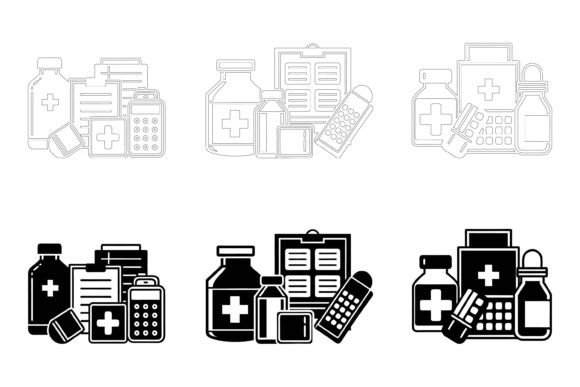
This is where thoughtfully produced vector illustration collections become genuinely useful. They fill a gap between expensive custom work and low-quality free alternatives. A well-built set of pharmaceutical container illustrations gives you the visual building blocks for presentations, website graphics, patient information leaflets, app interfaces, infographics, and marketing collateral—without starting from scratch every time.
The practical advantage is straightforward. When you have access to properly layered AI and EPS files, you can isolate individual elements, recolor surfaces and labels, scale objects without quality loss, and adapt the visual style to match your brand guidelines. For Mac and Windows users alike, this cross-platform compatibility removes friction from collaborative workflows where designers might be working on different operating systems.
What Separates Useful Illustration Assets from the Rest
Not all vector illustration sets are created equal, and anyone who has downloaded a poorly organized file knows the difference immediately. The most practical collections share several characteristics that directly affect how efficiently you can work with them.
File organization matters more than most people expect. When you open an AI or EPS file and find clearly named layers, grouped objects that make logical sense, and a consistent structure across multiple illustrations, you spend less time hunting for elements and more time actually designing. This is especially true when working with pharmaceutical container imagery, where labels, caps, liquid levels, and container bodies might all need independent editing.
Detail consistency is another marker of quality. Medical and pharmaceutical visuals require a degree of precision that casual icon sets simply do not provide. The proportions of a medicine bottle, the thread pattern on a cap, the reflective properties of amber glass, and the way a label wraps around a cylindrical surface all contribute to whether an illustration looks credible or noticeably off. High-quality sets maintain this attention to detail across every object in the collection.
Versatility determines how many projects a single purchase can support. A pharmaceutical container illustration might appear on a printed brochure one week, a responsive website the next, and a mobile app interface the week after. The same graphic should hold up at business card scale and billboard dimensions. Vector formats inherently support this flexibility, but only if the original artwork was constructed with clean anchor points, appropriate detail levels, and scalable design choices from the start.
Real-World Applications Across Different Professional Roles
Different professionals engage with pharmaceutical container visuals in different ways, and the value proposition shifts depending on what you are trying to accomplish.
Healthcare Marketers and Brand Managers
For those responsible for pharmaceutical branding and product marketing, visual consistency across channels is non-negotiable. An illustration set with editable color schemes allows you to match your specific brand palette without commissioning new artwork. You can adapt container imagery for email campaigns, social media posts, trade show displays, and product catalog pages while maintaining a cohesive look. The ability to modify labels and packaging details means you can represent your actual product line accurately rather than settling for generic approximations.
Medical Educators and Content Developers
Patient education materials benefit enormously from clear, recognizable imagery. When you are explaining medication adherence, proper storage practices, or the differences between dosage forms, illustrations of pharmaceutical containers provide visual anchors that help learners retain information. Educators developing e-learning modules, printed handouts, or instructional videos can use these assets to create consistent visual references throughout their curriculum. The organized layer structure makes it practical to highlight specific container features—like safety caps or tamper-evident seals—by isolating and emphasizing relevant elements.
UX and App Designers
Healthcare apps frequently incorporate pharmaceutical imagery for medication reminders, pharmacy locators, prescription management interfaces, and telehealth platforms. Designers need container graphics that read clearly at small sizes, work across light and dark interface modes, and integrate seamlessly with the overall design system. Having source files that can be easily recolored and adapted saves significant iteration time during the design and prototyping phases.
Freelance Designers and Small Studios
For independent creatives juggling multiple client projects, time is directly tied to profitability. A ready-to-use illustration set that covers a broad range of pharmaceutical container types means you can respond to client requests faster and take on projects that might otherwise require outsourcing illustration work. The inclusion of both AI and EPS formats, plus JPG previews, gives you immediate options whether you are deep in an Adobe Illustrator workflow or quickly pulling reference images for client approval.
Practical Considerations Before Purchasing
No single illustration set covers every conceivable pharmaceutical container variation. Before purchasing, consider the specific container types included and whether they match your typical project needs. Does the collection include the vial types, bottle formats, blister packs, and dispensing containers relevant to your work? Is the artistic style compatible with your existing brand assets and the expectations of your audience?
Also worth evaluating is how easily you can extend or modify the illustrations. Even with well-organized layers, the learning curve for customizing vector artwork varies. Designers comfortable with Adobe Illustrator will find AI and EPS files straightforward to work with. Those less familiar with vector editing software might face a steeper adjustment period, though the presence of organized layers and groups significantly eases that transition.
File format support is another practical checkpoint. The combination of AI, EPS, and JPG covers most professional workflows. AI files preserve full editability in Adobe Illustrator. EPS files offer broader compatibility with other vector applications and legacy systems. JPG files provide quick access for previewing, client presentations, or direct use in projects where raster formats are sufficient. Having all three in a single purchase eliminates format conversion headaches.
Quality Indicators That Predict Long-Term Usefulness
When assessing any illustration resource, certain signals suggest whether it will remain useful beyond the first project or gather digital dust in a forgotten folder.
Layer discipline is one of the strongest predictors. Files with logically named, hierarchically organized layers indicate that the creator understood how real designers work with assets. You should be able to toggle visibility, apply color changes to specific components, and export isolated elements without untangling a mess of unnamed paths and groups.
Edge quality and scalability reveal the technical skill behind the artwork. Smooth curves, consistent stroke widths, and anchor points placed with intention all contribute to illustrations that scale gracefully. This becomes especially apparent when you zoom in on container details like cap ridges, label edges, or liquid surface lines.
Visual coherence across the entire set matters for projects where multiple container types appear together. Consistent lighting direction, shadow treatment, line weight, and color palette across all illustrations create a professional impression that mismatched graphics cannot achieve. This coherence makes the difference between work that looks custom-created and work that looks assembled from disparate sources.
Who Gains the Most from This Type of Resource
Pharmaceutical container illustrations have clear utility for a defined range of professionals. Healthcare marketing teams producing product collateral will find immediate applications. Medical writers and instructional designers creating patient-facing materials benefit from visuals that clarify written instructions. App developers building healthcare tools need interface-ready graphics. Small pharmacy owners developing their own promotional materials gain access to professional-grade visuals without agency pricing.
The resource is less suited to professionals who need photorealistic renderings for regulatory submissions or scientific publication. Vector illustrations, however detailed, represent an idealized or stylized version of physical objects. For contexts requiring strict photorealism or exact product specifications, photography or 3D rendering remains the appropriate choice.
Similarly, organizations with highly specialized or proprietary container designs may find that generic illustrations only partially serve their needs. While editable labels and colors help bridge the gap, unique container shapes or proprietary delivery systems might still require custom illustration work to represent accurately.
Integrating Pharmaceutical Container Illustrations into Your Workflow
The most effective way to incorporate these assets is to treat them as flexible foundations rather than finished graphics. Start by identifying the container types that match your content. Adjust colors to align with your brand palette or the visual conventions of your industry. Edit labels to reflect actual product names, dosage information, or educational messaging. Consider removing unnecessary detail for applications requiring simpler icons, or adding contextual elements like packaging, pharmacy shelves, or patient hands for richer narrative visuals.
For infographics, pharmaceutical container illustrations serve as intuitive category markers. Readers instantly recognize a pill bottle icon as representing oral medications, an ampoule as indicating injectables, and a tube as suggesting topical applications. This visual shorthand speeds comprehension and reduces the cognitive load of data-heavy healthcare graphics.
The cross-platform compatibility between Mac and Windows environments deserves specific mention for teams with mixed operating systems. Designers can share source files without format conversion worries, and the JPG previews ensure that non-design stakeholders can review visuals without specialized software.
Making an Informed Decision
Illustration resources exist on a wide spectrum of quality and usefulness. The pharmaceutical container category is specific enough that high-quality options are not available everywhere. When you find a collection that combines organized file structure, attention to detail, format flexibility, and practical editability, it represents a tool that can support multiple projects over an extended period.
The question to ask yourself is whether the container types, artistic style, and customization potential match the projects currently on your horizon. If you regularly produce healthcare-related visual content—whether for marketing, education, product design, or digital product development—having a reliable set of pharmaceutical container illustrations reduces friction in your workflow and elevates the visual consistency of your output. Those benefits compound with each project where you reach for the same well-organized source files instead of starting from nothing.
For professionals who value efficiency, quality, and creative control, the right illustration collection functions less like a one-time purchase and more like a reusable asset library that supports your work across clients, campaigns, and platforms. In the specialized world of pharmaceutical and healthcare visuals, that kind of practical utility is worth recognizing.