Cute Swiss Roll Mascot Vector Pack 02
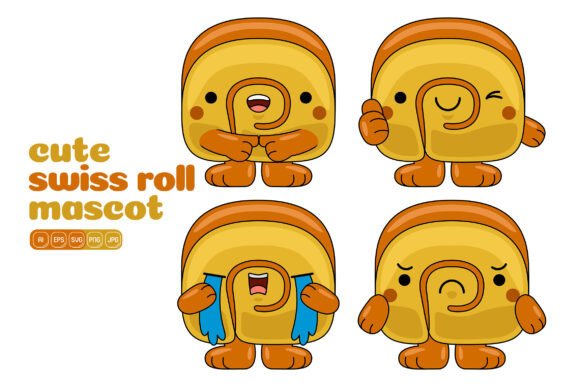
When you need a friendly face to carry a message, inject warmth into a brand, or simply make someone smile as they scroll through a feed, food characters often do the heavy lifting. The Cute Swiss Roll Mascot Vector Pack 02 builds on that idea with a collection of 100 high-resolution dessert-style vector illustrations. Instead of starting from a blank canvas every time, you get flat design assets that handle the drawing work while leaving the creative direction entirely up to you. The appeal goes beyond novelty—these little mascots become visual shorthand that audiences instantly recognise.
Many people assume mascot packs are only for children’s content, but the reality is much broader. A whimsical swiss roll character can sit comfortably in an email newsletter, a product label, a small business loyalty card, or an onboarding screen inside an app. What makes this particular pack stand out is the mix of ready‑to‑use poses and expressions combined with extensive file format support, so you never have to compromise on output quality whether you’re printing flyers or building a responsive website hero section.
Where Dessert Characters Come to Life in Your Projects
It helps to think about exactly where a smiling cake roll fits naturally. Food bloggers often struggle to find unique visual assets that don’t look like generic stock photography. With this pack, a blog post about rolled cakes can feature an original illustration that matches the tone of the writing. A confectionery startup might place a tiny swiss roll mascot next to a coupon code, instantly softening a promotional graphic without screaming “discount.”
The files are designed to work in Adobe Illustrator, but you also get EPS, SVG, PDF, JPG, and PNG options. That range covers nearly every software eco‑system. If you use Affinity Designer, Figma, Canva, or even Microsoft Word for quick layouts, the SVG and PNG formats allow you to drag and drop without losing the crisp edges you expect from vector artwork. The transparent background PNGs, in particular, give you freedom to layer a character over photos, textured paper backgrounds, or gradient overlays without awkward white boxes.
From Social Media Scroll-Stoppers to Print Perfection
Social media thrives on emotional connection, and a relatable food character often stops thumbs mid‑scroll. A freelancer running a baking workshop could use a swiss roll mascot as a recurring “host” in Instagram Stories, changing its colour palette to match seasonal themes. The fact that every shape is individually editable means you can recolor the strawberry topping, adjust the shadow tone, or swap out accent details without needing to reconstruct the whole piece. For animated posts, you can break the vector apart and bring the layers into After Effects or Procreate, keeping frame rates smooth because the source art is clean.
Moving to print, the 3000 x 3000 pixel base dimensions at 300 DPI translate to generous physical sizes. You can blow up a character for a window decal in a café, shrink it down for a thank you card, or tile several poses across a wrapping paper design. Because the style stays consistent across all 100 illustrations, you can create a pattern or themed collection that feels intentionally designed, not cobbled together from different sources. Small business owners creating merchandise (like stickers, enamel pin concepts, or tote bag prints) have used similar packs to test products before commissioning custom art, saving both time and upfront cost.
Real-World Scenarios That Show the Pack’s Flexibility
Let’s look at a few situations where the Cute Swiss Roll Mascot Vector Pack 02 solves actual workflow problems. A marketing coordinator at a subscription box company needs to design a “Welcome” insert for the month’s dessert‑themed box. Instead of emailing back and forth with an illustrator, she opens the AI file, picks a character holding a blank banner, types the welcome message in the banner space, adjusts the colour to match the box’s interior tissue paper, and exports a print‑ready PDF. The turnaround drops from days to under an hour.
An educator creating a digital worksheet for kids wants visual cues that guide attention without being distracting. By importing one of the SVG files into Google Slides, she places a tiny swiss roll next to each instruction, using a consistent character to signal “action needed.” The flat design style keeps the page clean, and the transparent PNG lets her overlay the mascot behind light‑tinted text boxes without readability issues. Because the files are resolution‑independent, the same worksheet looks sharp on a tablet, a Chromebook, and a printed handout.
A freelance web designer building a landing page for a baking app wants a hero graphic that feels playful yet refined. She grabs a character from the pack, customises its colour to match the app’s brand palette—think muted matcha tones instead of bright candy pink—and positions it next to a headline. Using the SVG file, the illustration remains razor‑sharp on retina screens, and the flat design prevents visual clutter that might compete with the call‑to‑action button. The result loads fast because SVG text code is lean, unlike huge raster images.
Customizing Cute Characters for Your Brand Voice
One feature that changes how people use this pack is the ease of colour editing. Every single shape is separate and selectable, so you can quickly remap the chocolate swirl from deep brown to a pastel blue if your brand leans toward softer aesthetics. This isn’t about having 100 random illustrations; it’s about having a starting point that bends to your visual identity. A stationery shop with a vintage‑pastel look can mute the colours and add a paper texture. A YouTube channel focusing on kid‑friendly content can pump up saturation and add bold outlines using Illustrator’s stroke panel.
The benefit also extends to accessibility. If your background colour needs high contrast for readability, you can change the mascot’s base tone to suit WCAG guidelines without ruining the cheerful character. Designers often overlook this when using stock clipart, ending up with a cute graphic that vanishes against a dark mode screen. Having full vector control means you address usability while keeping the personality intact.
Combining Elements to Build Your Own Unique Illustrations
The pack isn’t limited to standalone characters. Because the elements exist as separate illustrations, you can mix and match components to build scenes. Take a swiss roll face from one pose, combine it with a speech bubble from another, and place a tiny prop (like a fork or a strawberry) from a third. The flat design style ensures the pieces visually fit together, even if you’re remixing across different files. This turns the pack into a personal illustration kit that grows with your ideas.
A publisher creating a children’s recipe book might need a recurring mascot that appears in different activities: baking, mixing, decorating. By taking the core character and repositioning arms or adding simple flourishes by editing anchor points, the same swiss roll can evolve across pages while maintaining brand consistency. Because you aren’t starting from scratch, you meet tight deadlines without sacrificing visual storytelling.
Practical Considerations Before You Download and Design
Even the best resources need a moment of planning before you jump into a project. Check that your primary design software handles the file formats you intend to use. Adobe Illustrator gives you the most direct editing for AI and EPS files, while SVG files are useful for web‑based tools, but some older versions of software might strip out certain transparency effects. Always test one file before committing to a full‑scale workflow. Fortunately, having both JPG and PNG high‑resolution options provides a safety net for non‑vector environments.
Think about how you’ll organise the 100 illustrations. Without a naming convention or folder structure, searching for the perfect pose can eat up creative time. A quick skim through the PDF contact sheet (if included, or by exporting one yourself) lets you tag favourite assets. Many users keep a “branded” copy of their top five mascots recoloured and saved as a template file, speeding up future projects from email signatures to social media templates.
Also consider the legal usage. Typically, vector packs allow commercial and personal use, but you’ll want to confirm the specific license terms—especially if you plan to use the characters in a logo or as part of a product for resale where the mascot becomes the primary value. Most packs from reputable sources cover a broad range of uses, but reading the fine print prevents headaches down the line. When in doubt, a quick email to the seller clarifies whether you can use the assets in a digital product, printed merchandise, or broadcast media.
Why Flat Design Style Works Across So Many Mediums
Flat design continues to dominate because it reduces visual noise. In an infographic about baking statistics, a flat swiss roll mascot adds charm without distracting from the data. The simplicity makes the illustration scale effortlessly from a mobile screen to a billboard without losing intent. Overly shaded or hyper‑realistic graphics can confuse the eye when resized, but flat vector art stays readable. That practical clarity is why tech companies, educational platforms, and modern lifestyle brands keep returning to this aesthetic.
The Cute Swiss Roll Mascot Vector Pack 02 harnesses that principle. You get characters that communicate emotion with minimal linework, which makes them ideal for both minimalist pastel website designs and bold, colourful event posters. The style also makes it easier for you to add your own hand‑drawn touches later, blending the ready‑made vectors with unique illustrations to produce something that feels entirely yours.
Making the Most of High-Resolution Output: Pixels, Paper, and Purpose
A frequent pain point with downloadable graphics is discovering they pixelate when you need a large print. The included 3000 x 3000 pixel JPG and PNG files at 300 DPI cover most standard print sizes up to 10×10 inches without quality loss. For larger formats, you rely on the vector source files (AI, EPS, SVG, PDF) because they scale infinitely. A banner stand at a trade show? Design it at 200% scale in Illustrator using the original vector data. The character’s gloss highlights and soft curves remain smooth, and the flat style prevents any blurry edges that high‑resolution monitors might expose.
Digital projects benefit from the PNG’s transparent background, which eliminates any halo effect when dropping the mascot onto a gradient. If you’re building a website hero image with a colour‑shifting background, the transparency ensures the character integrates seamlessly, regardless of the underlying hex code. Marketers A/B testing landing page visuals often swap out a generic illustration for a mascot, and the transparent PNG makes that swap painless without needing to re‑export the entire composition.
Beyond conventional print and web, think about less obvious applications. A hobbyist crafting a planner sticker sheet can place several PNGs onto a letter‑sized canvas, print on adhesive paper, and cut them out. A small bakery may embed one of the characters into an NFC‑enabled business card, adding a playful touch to an otherwise corporate networking tool. The pack’s versatility comes from the combination of file formats and the universally endearing nature of dessert mascots—they stay relevant regardless of niche.
Building Content Systems Around a Recognisable Mascot
Consistent character usage turns a one‑off graphic into a brand asset. If you run a YouTube channel about simple desserts, featuring the same swiss roll character in each thumbnail creates a visual signature. Viewers begin to associate the mascot with your content, which improves click‑through rates over time. The pack’s 100 variations allow you to produce multiple thumbnails without repeating the exact same pose, keeping the channel feed fresh while maintaining familiar branding.
Email marketers might use a “spot the mascot” Easter egg in monthly newsletters, encouraging subscribers to click through to a hidden recipe or discount. Because you can extract and slightly modify elements, you can create tiny variations week after week without redesigning from scratch. This kind of playful consistency often leads to higher engagement than stock photography because it feels personal and intentional.
Educators who design course materials on platforms like Teachable or Thinkific can use the mascot as a guide character. A swiss roll holding a “Tip” sign becomes a recurrent visual, helping students mentally connect with the learning module. The emotional response to a cute character lowers cognitive friction, making dense information feel friendlier. Over a 12‑module course, the visual continuity makes the learning experience feel polished and thoughtfully designed, which reflects well on the instructor’s professionalism.
A Quick Reminder on Working Smart
Before you dive into your first project with the Cute Swiss Roll Mascot Vector Pack 02, spend 15 minutes customising a few favourites into a personal style guide. Set your brand colours, pick three to five core poses, and save them as a starter template file. This small upfront investment prevents you from losing momentum later when you need a graphic quickly. The pack’s ease of editing becomes even more valuable when every asset is aligned with your visual identity from the moment you open the folder.
Also, don’t be afraid to combine the characters with other vector elements you already own. The flat design style acts as a neutral visual language, so mixing in fruits, kitchen utensils, or typography from your existing library creates a cohesive composition. The goal isn’t to use all 100 illustrations in one project but to let the collection serve as an ever‑ready illustration toolkit that adapts to whatever creative need pops up next.