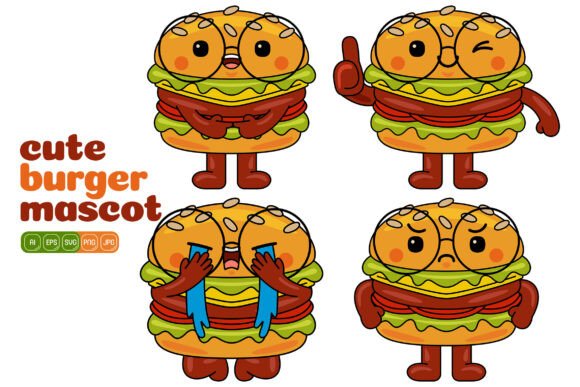
Cute Burger Mascot Vector Pack 02: A Versatile Illustration Tool for Creatives
Sometimes the smallest visual details carry the most weight in a design. The right character can turn a bland flyer into something people pause to read or give a website a warmth that stats and charts never could. The Cute Burger Mascot Vector Pack 02 lands squarely in that space—a collection of 100 distinct vector illustrations built around a playful food theme, ready to drop into projects that need a dash of personality. It isn’t just clip art. It’s a flexible resource for people who create things day in and day out and need assets that adapt rather than dictate.
What makes a pack like this practical is the sheer range of formats and the flat design style. You get Adobe Illustrator files, EPS, SVG, PDF, high‑resolution JPG, and PNG with transparent backgrounds, all at 3000 x 3000 pixels. Each shape can be recolored, resized, and separated without losing crispness. That means a marketer working on a last‑minute social campaign, a teacher assembling a classroom activity sheet, or a print shop owner prepping a menu board all touch the same source material and walk away with completely different finished pieces. The consistency of the flat design keeps the mascot readable at thumbnail size and still charming blown up on a storefront banner.
Where Food Mascots Shine in Digital and Print Media
Scroll through a food‑themed Instagram feed or a small restaurant’s landing page and you’ll quickly notice which brands commit to a visual character and which ones rely on stock photography alone. A mascot acts as a shortcut to recognition, and burgers happen to be one of those universal symbols that don’t need much explanation. With the Cute Burger Mascot Vector Pack 02, you aren’t stuck with one pose or expression. You get 100 variations, which means you can maintain a consistent character across multiple touchpoints while showing different moods—happy for a promotion, puzzled for a quiz graphic, waving for a welcome banner.
In social media, the PNG files with transparent backgrounds become the most immediate asset. Drop a smiling burger onto a bold background for a Tuesday special, overlay a winking burger on a photo of fries for an Instagram Story, or use several poses in a carousel post explaining a loyalty program. Because the resolution is so high, the same illustration works for a website hero image and a printed tent card without any loss in quality. The EPS and AI files let you scale up further if you need to wrap a delivery vehicle or create a trade show backdrop. This kind of cross‑channel versatility is precisely what saves hours of searching for matching assets later.
Print materials benefit just as much. Menus feel less sterile when a cute mascot guides the eye toward combo meals. Flyers for a school fun fair or a community barbecue suddenly look more inviting with a cheerful burger character holding a sign. Because every element is vector, you can pull a ketchup bottle or a lettuce leaf from one illustration and place it next to text without distortion, building a custom layout rather than dropping in a single static image. The flat design style also means the colors stay vibrant on coated paper, newsprint, or even a digital screen in a food court kiosk.
Building a Cohesive Brand with Playful Imagery
Small food businesses often juggle a dozen roles, and brand identity can get pushed aside until it’s time to redesign the takeout bag. A vector mascot pack lowers the barrier to visual consistency. Rather than commissioning a custom illustration series from scratch—which can eat up both time and budget—a burger joint or a food truck can start with the Cute Burger Mascot Vector Pack 02 and tailor it to match existing colors. If the brand palette leans teal and mustard, recoloring the bun, patty, and accessories takes a few clicks in Illustrator. Suddenly the mascot feels proprietary, even though it started as a ready‑made resource.
Beyond printed menus and social posts, the mascot works on loyalty stamp cards, window decals, staff T‑shirts, and even on‑hold screens for a point‑of‑sale system. The SVG files embed smoothly into websites so the character can animate a loading screen or react to a button hover without turning into a pixelated mess. This kind of omnipresence builds a visual thread that regular customers start to recognize, much like a mascot for a major chain but at a fraction of the effort and cost. Freelancers offering branding packages to local eateries can use the pack as a foundation, layering clients’ custom typography and messaging around an already‑polished character set.
What often gets overlooked is the freedom to edit. These aren’t flattened images. In the AI and EPS files, every burger illustration is built from individual shapes. Want to swap the hat or remove the speech bubble? You can. Need a version holding a sign that didn’t originally come with one? You can grab a hand element from one file, pair it with a blank sign shape from another, and create something new. This modular approach transforms 100 illustrations into hundreds of potential combinations without requiring advanced drawing skills. It’s one of the quiet strengths of well‑structured vector packs—they give you building blocks instead of finished puzzles.
Educational and Entertaining Materials That Connect with Audiences
Educators and content creators face a different set of challenges. Worksheets, digital games, and video thumbnails compete for attention among audiences with short attention spans. A friendly food character can make a multiplication drill feel less like a chore or turn a nutritional guide into something kids actually want to color. The Cute Burger Mascot Vector Pack 02 fits into these scenarios because the flat design style is simple enough for young learners to parse but expressive enough to carry a punchline in a YouTube thumbnail or a blog header.
Imagine a speech therapist using the burger characters in a social story about ordering food at a restaurant. The high‑resolution PNGs drop into a presentation tool like Canva, Google Slides, or PowerPoint without any background clutter. The therapist can resize the burger to sit beside a counter, pair it with text bubbles, and even change the burger’s facial expression to model different emotions. Another example: a language teacher creating flash cards for food vocabulary. The SVG files open in any modern browser, so an interactive quiz on a classroom tablet can display the vector burger without lag or fuzziness. That same teacher can later print the JPG versions at 3000 x 3000 pixels onto sturdy cardstock and have a set of physical cards that look just as crisp.
Bloggers writing about kid‑friendly cooking can use the illustrations to break up long recipe posts. A sequence of burger mascot actions—mixing, frying, assembling—can guide readers through the steps without requiring photos of each stage. This kind of visual storytelling often performs better in terms of shares and reader engagement because it feels approachable, and it doesn’t date as quickly as photography with specific kitchen tools in the frame. The mascot stays relevant for years, and you can recolor the background to match a seasonal theme or a site redesign in minutes.
How Different Professionals Make the Most of This Pack
The way a freelance social media manager uses the Cute Burger Mascot Vector Pack 02 differs from how a print shop designer or a small business owner might approach it, and that’s by design. A social media manager might spend an afternoon creating a library of 30 pre‑styled PNG overlays: a burger with a megaphone for announcements, a burger holding a heart for customer appreciation posts, a burger on a skateboard for a youth‑oriented campaign. By saving these as templates, they can respond to real‑time marketing opportunities in a few minutes flat, always pulling from the same visually cohesive set.
A print shop designer, on the other hand, is likely to dive into the AI and EPS files to set up production‑ready artboards. They will check CMYK color modes, outline strokes, and ensure that the mascot scales to different signage sizes without unexpected line weight issues. Because the pack provides both high‑resolution raster backups and fully editable vectors, the designer can run one version through a large‑format RIP software for a wall mural and export another for a table tent from the same source file. The time saved by not recreating art from scratch often means the difference between hitting a client’s print deadline and pushing it back.
Small business owners without a design background may stick with the JPG and PNG files initially, using free online tools like Canva to drop the illustrations into pre‑made templates. Even a basic Instagram post template becomes more distinctive with a custom‑chosen burger character peeking out from the corner. The 3000 x 3000 pixel canvas means they can crop in tightly for a square social graphic or leave breathing room for a poster layout. As their confidence grows, they might open the SVG file in a free vector editor and start experimenting with color swaps to align the mascot with seasonal promotions—pumpkin‑toned buns in October, pastel shades in spring—all without buying additional assets.
What to Look for Before You Download Vector Illustration Packs
Not every vector pack delivers on its promise once you unzip the folder. Before relying on an investment like the Cute Burger Mascot Vector Pack 02, it’s worth checking a few practical points. First, the number of truly distinct illustrations matters. Some packs inflate counts by offering minor color swaps as separate files; here, 100 distinct vector illustrations are provided, each with unique poses, expressions, and elements, which means more genuine variety when you are building a campaign. Second, compatibility should not be an afterthought. If your workflow revolves around Affinity Designer, CorelDRAW, or even free software like Inkscape, you need to look for formats like EPS and SVG that those applications can read without hiccups. The inclusion of AI files alongside EPS, SVG, PDF, JPG, and PNG makes this pack flexible enough to slot into almost any toolchain.
Another consideration is the editing experience. Opening a vector file only to find that layers are merged or shapes are unnecessarily grouped can turn a quick customization into a frustrating digging exercise. Well‑structured artwork lets you select a single element—say, the tomato slice—and change its color without disturbing the rest of the burger. When shapes are thoughtfully named and organized, even beginners can learn the basics of vector editing by experimenting on a ready‑made character. High resolution for the raster files is equally critical. 3000 x 3000 pixels gives print designers room to manipulate the image at 300 DPI for a crisp 10‑inch print, while digital designers can use the same file for a Retina screen and still have a sharp result.
Licensing is another quiet detail that can cause problems down the road. Most vector packs come with either personal‑use or extended commercial licenses. If you plan to sell printed merchandise, incorporate the illustrations into a logo, or offer design services that pass the asset to a client, you need to understand the usage rights. The ease of editing that this pack promises—changing colors, combining elements, creating derivative illustrations—becomes genuinely valuable only when those modifications are actually permitted under the license you purchase. Checking the license terms before you build a product line around the mascot saves headaches later.
Practical Ways to Combine Elements and Create Your Own Illustrations
One of the standout strengths of this collection is the invitation to mix and match. You aren’t limited to the 100 illustrations in their original form. Because the burgher characters are built from separate components—faces, hands, food items, accessories, speech bubbles—you can open two or more files and pull pieces together. A designer creating a “family meal deal” promotion might take a larger burger in a chef hat, borrow a pair of smaller burger figures from other files, and arrange them on a picnic blanket background drawn from scratch. The cohesive art style ensures that the combined result looks like a single commissioned piece, not a patchwork.
Infographic creators will find this especially useful. Instead of generic icons for a food industry stat, you can use the exact same mascot that appears elsewhere in the report or social carousel. Take a burger holding a number sign, change the number to a percentage, and place it next to a data point about burger consumption. Then take another burger looking surprised, and use it as a decorative element beside an unexpected finding. Readers process the data faster because the character’s expression provides an emotional cue. The PDF and SVG files integrate well into InDesign or Affinity Publisher layouts, retaining their editability if you need to tweak the infographic later.
Even print products like sticker sheets or planner inserts come to life with these variations. Crafters who sell at markets can select a dozen favorite mascot poses, recolor them to match a pastel or neon theme, and arrange them on a print‑ready sheet. The transparent PNG backgrounds mean no white boxes around the characters when they are placed on a colored sticker backing. The individual shapes can also be enlarged to make a single bold sticker for a laptop or water bottle, with the crisp vector curves ensuring the edges stay smooth even at that scale.
The Real Value of a High‑Resolution, Multi‑Format Asset
When a project calls for consistency across digital and physical media, the file formats you have on hand often determine how smoothly the work flows. The Cute Burger Mascot Vector Pack 02 doesn’t lock you into a single output. You can render a JPG for a Facebook post in the morning, pull the SVG into a web animation in the afternoon, and export a print‑ready PDF for a client’s menu by evening, all from the same core artwork. The high resolution means you rarely have to worry about re‑exporting at different sizes—3000 by 3000 pixels is generous enough for most common use cases, and the vector versions handle anything larger without degradation.
Flat design also ages more gracefully than styles reliant on heavy gradients or textures. A character built from clean geometric shapes stays relevant as design trends shift, and it’s easier to recolor in bulk if a project’s palette evolves. This practicality extends to collaboration. Multiple team members can work with the same pack simultaneously: one creating a social media kit using the PNGs, another building email graphics with the JPGs, a third designing packaging with the AI files. Everyone draws from a shared visual language, and when the burger mascot appears on an Instagram ad and a physical coupon, the family resemblance is unmistakable.
Ultimately, the usefulness of a vector pack like this comes down to how often you reach for it. Hundreds of illustrations sitting in a folder don’t create value on their own. But when they’re easy to browse, simple to edit, and ready to drop into whatever canvas you’re working on—whether that’s a website, a presentation slide, a T‑shirt template, or a laminated classroom poster—they become part of your daily toolkit. The Cute Burger Mascot Vector Pack 02 earns its place not because it promises instant miracles, but because it respects the real way people design: piece by piece, under deadlines, across platforms, and with a need for assets that adapt rather than break.