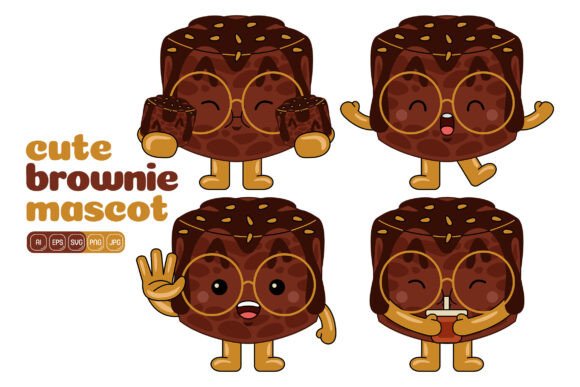
Cute Brownie Mascot Vector Pack 02: A Versatile Asset for Visual Storytelling
Finding illustrated characters that feel friendly without tipping into childishness is a common challenge for grown-up brands. The Cute Brownie Mascot Vector Pack 02 offers a practical middle ground. It delivers a set of dessert-themed mascot graphics designed to work across marketing materials, educational content, social feeds, and even print production. Instead of a single static figure, you get a large library of 100 individual vector illustrations, all built around the same warm, approachable baked-good character. What makes the pack worth a closer look isn't just quantity, but the deliberate simplicity that lets you reshape it for very different outputs without breaking the visual story.
For anyone who needs consistent branding but lacks the time or budget to commission custom character work, this kind of resizable, recolorable asset fills a specific gap. The brownie motif sits comfortably in food, hospitality, kids’ entertainment, or casual lifestyle niches. Over the next several paragraphs, we’ll walk through what arrives in the download, how well it holds up under real-world editing, and where it genuinely adds value — along with a few honest observations about its scope.
What You Actually Get in the Download Folder
A single mascot concept can feel limited if you just receive a few poses. Here, the pack’s strength is that you gain a full cast of expressions, actions, and isolated props to build fresh scenes. These aren’t just slight rotations of the same face; you’ll notice varied body language, playful gestures, and accessory swaps that keep the character recognisable but context-switch ready.
The technical foundation matters because assets live in your pipeline, not just in a preview window. The Cute Brownie Mascot Vector Pack 02 ships with a solid spread of industry formats:
- AI (Adobe Illustrator): native vector file with full layer structure for deep editing.
- EPS: widely compatible vector format for older software or cross-team sharing.
- SVG: ready for web use, Canva imports, and responsive interface design.
- PDF: convenient for quick client reviews or print vendor hand-offs.
- JPG: high-resolution raster at 3000×3000 pixels, useful for straightforward drop-ins.
- PNG: same large dimensions with transparent background — essential for layering on colored banners or photo composites.
Everything comes in a flat design style with clean edges, so strokes remain crisp at small badge sizes and at poster scale. The 3000×3000 pixel canvas gives enough density that you can crop tightly without visible softness in printed pieces. For a pack targeting infographics, social media banners, landing pages, and printables, having a unified resolution across all 100 illustrations removes the step of sizing-up mismatched assets.
Real-World Flexibility: Resize, Recolor, and Remix
The description claims each and every shape can be recolored, and in practical use, that holds true. Because the flat style relies on solid fills with minimal complex gradients, selecting a new palette inside Illustrator is quick. You can take the standard warm brown palette and shift it to a cool chocolate mint tone, a strawberry pink twist, or even a bold brand color that has nothing to do with baked goods. This ability to recolour without artifacts is what separates a true vector pack from pre-shaded clip art that fights you when you try to make it your own.
Beyond recoloring, the design encourages element combination. A brownie holding a sign, another pointing, a third wearing glasses, a cup of cocoa, a spatula, decorative swirls — these are examples of the modular approach visible in the pack. Because each piece shares the same illustration scale and viewpoint, you can drag a speech bubble from one file, place it next to a smiling brownie from another, and the result feels intentional rather than forced. That opens the door to creating custom infographic panels, step-by-step recipe illustrations, onboarding guide characters, or even short comic strips for email campaigns.
Resizing is just as straightforward. Vector files scale infinitely, and the high-resolution rasters at 3000×3000 pixels give a safety net for non-vector workflows. When you drop a PNG into a Canva design or a PowerPoint presentation, it stays sharp even when you enlarge it to fill a wide-format slide. For social media, where square, portrait, and landscape crops rotate constantly, having one source that works for all is time-saving.
Where the Flat Design Style Shines (and Its Limitations)
Flat design has been around long enough that it’s no longer a trend — it’s a reliable communication style. The Cute Brownie Mascot Vector Pack 02 uses this to its advantage. No drop shadows, no glossy highlights, no gradients that complicate print separations or clash with UI elements. The result is a mascot that feels modern but not dated to one specific year. For a brand whose visual identity needs to stay coherent over two or three seasons, that consistency is valuable.
The flip side is that flat illustration won’t satisfy everyone. If your brand aesthetic leans toward realistic rendering, 3D characters, or highly textured painterly styles, this pack will feel too graphic. That’s not a fault — it’s a design choice. The brownie mascot is charmingly simplified, making it excellent for icons, app onboarding screens, children’s activity sheets, or bakery signage where readability trumps photorealism. Understanding that boundary helps you assess fit before investing creative time.
Why 100 Illustrations Matter More Than a Single Mascot
The number matters for a practical reason: versatility without repetition. A single mascot in five poses can wear thin when you publish daily social posts, seasonal promos, newsletter headers, and blog graphics week after week. With 100 distinct illustrations, you can rotate through cheerful waving, holding a blank card (ideal for call-to-action text), reading a book, baking, pointing at a chart, and so on. This range supports a content calendar that doesn’t feel monotonous.
For infographics, this variety is especially useful. You might assign different brownie poses to each data section — a curious brownie for an intro stat, a confident brownie next to growth numbers, a relaxed brownie for a summary. Because the character designs sit within the same proportional system, the visual thread remains unbroken across the graphic. The same logic applies to landing pages, where a single character can appear in the hero area, then again near a testimonial or feature block, creating a brand mascot presence that feels intentionally designed rather than stock-photo-generic.
Editing Experience and Workflow Compatibility
The files are built for Adobe Illustrator, but that doesn’t mean non-Illustrator users are locked out. EPS and SVG open in Affinity Designer, CorelDRAW, Inkscape, and even some online editors. The real test is file organisation. A well-structured AI file labels layers clearly, groups related objects, and avoids unnecessarily merged shapes. A quick look at the files shows a clean internal setup — recoloring a brownie’s apron or changing the icing color on a cupcake element takes a few clicks rather than a pixel-level isolation struggle.
For teams that handle print production, having a PDF alongside editable vectors speeds up proofing. The JPG and PNG high-res options let non-design team members pull assets into internal documents without requesting vector conversions. This cross-format readiness means the pack fits into a workflow whether you are a solo freelancer who lives in Illustrator or a small business owner who works mostly in Canva and PowerPoint. The transparent PNG files deserve specific mention; they’re sized at 3000×3000 pixels with clean edging, so placing a brownie on a coloured background in a social template doesn’t leave a white halo.
Specific Use Cases Where This Pack Delivers
Understanding when an asset becomes genuinely helpful versus when it gathers digital dust can guide purchase decisions. Based on the contents, these are some scenarios where the Cute Brownie Mascot Vector Pack 02 fits naturally:
- Bakery or café social media branding. Post seasonal specials, loyalty program announcements, or behind-the-scenes content with a consistent mascot voice.
- Children’s educational materials. Flash cards, reward charts, and activity book pages benefit from friendly, recognizable food characters that won’t distract with excess detail.
- Recipe blog illustrations. Step-by-step brownie-making visuals, ingredient sections, or printable recipe cards feel cohesive.
- Event promotion for bake sales or charity dessert contests. Create posters, digital banners, and ticket designs with the same character set.
- Product packaging mockups for dessert brands. Use the vectors in presentation decks or early-stage label concepts to communicate brand personality without commissioning custom art upfront.
- Email newsletter graphics. Seasonal headers, birthday mailouts, or product launch announcements become more personable with a small mascot beside the text.
Small business owners who manage their own marketing will likely find the reuse value high. A single vector pack that can update monthly specials, Instagram stories, and printed flyers reduces the constant search for new imagery. Similarly, freelance designers who handle multiple food or lifestyle clients can keep this in their toolkit for quick-turn projects where a custom illustrated character isn’t in scope or budget.
Potential Drawbacks and Who Might Skip This Pack
No resource fits every brief. The mascot is undeniably a brownie — if your brand has nothing to do with desserts, sweets, or related comfort themes, the pack will feel forced. A tech startup selling enterprise SaaS, for example, would struggle to make a smiling brownie feel relevant, no matter how well they recolor it. The theme specificity is both a strength and a gatekeeper.
Additionally, the flat design, while versatile, lacks the depth of shaded or textured illustration styles. If your target audience expects a high-end, artisanal illustration look, these graphics might read as too casual. That’s fine for coffee shop menus or kids’ apps, but less so for luxury chocolate packaging targeting a sophisticated adult palette. Also, while 100 illustrations sound generous, a handful are likely smaller props (a whisk, a single cherry, a baking tray), so the actual number of full character poses is somewhat lower, though still substantial. Still, those props contribute to the mix-and-match capability, so they aren’t wasted.
Long-Term Value and Reuse Potential
Because the files are fully vector, there’s no expiration date tied to screen resolutions or print sizes. For content creators who maintain an asset library over years, this pack doesn’t degrade. You can reopen the AI files in five years and still output at any size required. That gives it a longer lifespan than raster-only packs that might start to show pixelation when display standards advance.
The ability to combine elements and create your own illustrations extends value beyond the initial 100 images. A creative user can generate seasonal variations — a brownie holding a heart for Valentine’s Day, a pumpkin-spice-colored palette for autumn, a frosty blue hue for winter promotions — all from the same core files. This scalability in creative output matters more to solo entrepreneurs and lean marketing teams than to large agencies with dedicated illustration budgets. For the former, it becomes a compact asset system rather than a one-off decoration.
Integrating the Pack Into a Professional Design Environment
For designers who regularly produce infographics, the vector nature means you can import individual elements into data visualization tools as SVG graphics and maintain sharpness on high-PPI screens. The flat design complements clean minimalist infographic layouts, and the brownie character can act as a visual anchor without overwhelming data points. In website and landing page contexts, SVG files keep page load times low while adding personality that stock photos often lack.
Print designers will appreciate that the EPS and PDF formats follow standard color mode expectations. Even though the pack arrives in a ready-to-use state, the flat fills are easy to convert to spot colors if you need to match specific Pantone shades for branded merchandise, tote bags, or café staff T-shirts. Because the shapes are simple, screen-printing separators won’t encounter the nightmare of blending modes and complex transparencies that plague many illustrated assets.
Overall, the Cute Brownie Mascot Vector Pack 02 doesn’t overpromise a magic solution to all design needs. It provides a large set of clean, adaptable dessert mascot illustrations that perform reliably across digital and print formats. Marketers, food bloggers, educators, and small business owners who need a recurring friendly character will extract the most mileage. When you can recolor every shape, resize without quality loss, and remix poses and props into original scenarios, you effectively stretch a single asset set across months of content. That practical reusability, combined with the broad format support, makes it a rational addition to a creative toolkit where a warm, approachable brownie character aligns with the audience.