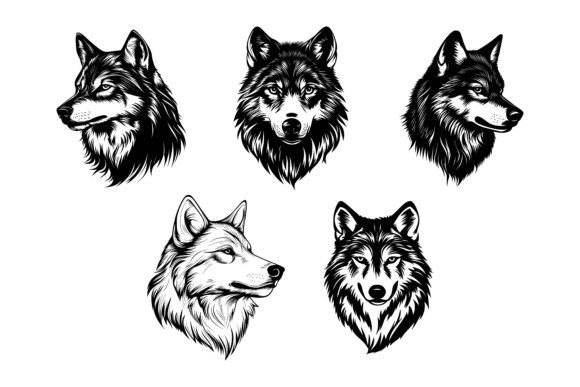
Set of Wolf Heads: A Practical Asset for Designers and Brand Builders
Every creative project begins with a search for the right visual language. Whether you are developing a new brand identity, refreshing a website, or crafting an educational infographic, the symbols you choose carry weight. The Set of Wolf Heads is a carefully organized collection of vector illustrations that fits into that early decision-making stage and continues to serve your process through final output. It provides a series of wolf head designs—majestic, stylized, or minimalist—built for immediate use and extensive modification. Understanding how such a resource integrates into a real workflow helps you move from concept to completion with more control and fewer obstacles.
Where Wolf Head Graphics Fit into the Visual Storytelling Process
Wolf imagery carries layered meanings across cultures: loyalty, independence, instinct, and resilience. When you bring a wolf head into a project, you are tapping into that narrative. This set becomes useful at the very beginning of a planning phase—during moodboarding, sketching, or presenting initial concepts to a client. A fitness brand might use a wolf head as a core emblem on apparel; a podcast host could incorporate it into cover art to signal a bold, pack-leader mentality; an educational publisher might place it inside a biology infographic. Before committing, you can test how different variations from the set align with the tone you need. Because the collection includes multiple styles, you avoid the time-consuming back-and-forth of commissioning a custom illustrator when you are still exploring directions.
In a typical workflow, selecting the right asset happens after you define the project’s message but before you dive into layout. The Set of Wolf Heads shortens that selection phase. Instead of sifting through disparate stock libraries, you get a coherent family of graphics. That coherence matters when you later need to use a consistent visual theme across several touchpoints—a web icon, a print flyer, a social media badge. Starting with a unified set reduces the risk of mismatched styles creeping in.
Before You Begin: Preparing Your Workspace and Understanding File Formats
Practical preparation saves hours later. The set includes AI, EPS, and JPG files, each serving a different purpose. The AI (Adobe Illustrator) and EPS files are vector-based, meaning you can scale a wolf head to billboard size or shrink it to a favicon without losing sharpness. The JPG versions give you a quick raster preview for placement in presentations, blog drafts, or non-design software where lightweight files matter.
Before integrating the Set of Wolf Heads into your active project, confirm that your primary design tool supports these formats. Adobe Illustrator, Affinity Designer, CorelDRAW, and even free options like Inkscape handle EPS and AI files well. If you work on a Mac or Windows system, the files are optimized for both environments—no conversion headaches. A smart first step is to open the AI file, duplicate the original layer group, and hide the original. That way you always have a clean reference to fall back on. Inside the file, the layer structure is neatly organized; each wolf head sits on its own clearly labeled layer or group. This attention to detail means you can isolate a single head, turn off backgrounds, or export individual elements without manually cleaning up stray points.
Seamless Integration into Your Existing Design Workflow
Integration does not require you to change how you work. You import the EPS into your document, position the wolf head, and immediately begin editing. Because vectors are resolution-independent, you can place the graphic inside a business card layout, a website header, or a large-format poster without worrying about pixelation. The consistent line weights and balanced proportions across all heads in the set let you combine multiple heads in one composition without a patchwork feel.
For a web designer, the process might look like this: open the AI file, choose a stylized wolf head, recolor it to match the brand palette using the global swatch panel, export as SVG, and drop it into the site’s icon system. For a print designer, the sequence is similar but ends with a CMYK EPS or a high-resolution TIF derived from the vector. In both cases, the Set of Wolf Heads acts as a flexible raw material rather than a fixed clip-art piece. You are in control of the outcome.
One underappreciated benefit is how the JPG files support fast prototyping. While building a storyboard or a wireframe, you can drag the JPG into a slide deck or a Figma frame to get quick feedback. Later, replace it with the refined vector for production. This dual-format approach keeps early-stage reviews moving while protecting final output quality.
Customization Without Compromise: Editing Wolf Heads for Specific Projects
The real strength of this set lies in how easily you can reshape the artwork to fit your vision. Change colors with a few clicks—replace stark black fills with earth tones for an outdoor brand, or use neon gradients for a gaming channel. Modify specific details: lengthen the snout, adjust the eye shape, remove the outer stroke for a minimalist silhouette. The clean vector construction means anchor points and curves are well-placed, so editing does not introduce distortions or weird artifacts. That perfection in details is not just a selling point; it directly influences how much time you spend tidying up after a modification.
If your project needs a symbol system, extract one wolf head, simplify it further, and create app icons or infographic markers. Because each head is built with consistency in mind, you can scale modifications across the whole set. For instance, if you lighten the muzzle on one head, applying the same change to another head in the set follows a predictable pattern, saving you from reinventing the technique.
Combining the Set of Wolf Heads with Other Tools and Assets
A graphic set rarely works in isolation. You will likely merge these wolf heads with typography, geometric patterns, photographic backgrounds, or other vector illustrations. The organized layer structure becomes critical here. When you place a wolf head into a larger composition, you can quickly turn off unnecessary paths—like a decorative mane or a secondary outline—to let the head blend with your existing elements. This keeps your workspace clean and your document file size manageable.
Imagine you are creating a merchandise design for a sports team. You pull a wolf head from the set, then link it with dynamic swooshes from another vector pack. Since the wolf head’s layers are separated logically (foreground, background, accent lines), you can interlace the new elements between them without flattening anything. This preserves complete editability for later adjustments. When you work in a team environment where multiple designers touch the same file, that organized layering reduces misinterpretation and accidental deletions.
Quality and Consistency: How Organized Layers Save Time in Production
Technical details shape day-to-day efficiency. The Set of Wolf Heads emphasizes neat organization and layer structure—traits that directly impact production speed. When you are under a tight deadline and need to export 20 different head variations for an app onboarding flow, you do not want to hunt through unnamed layers or guess which group contains the “head outline.” Properly named, grouped, and ordered layers let you batch-export with confidence. The perfection in details also extends to the artwork itself: smooth curves, balanced symmetry, and consistent style across the set. This reduces manual tweaking because you are not correcting the illustrator’s work; you are building on top of it.
For infographic designers, uniformity matters immensely. You might use five different wolf heads as visual markers for five wilderness survival facts. If each head had a slightly different stroke thickness or angle, the infographic would look sloppy. The consistent construction of this set ensures that when you place them side by side, they read as a family. That visual harmony supports better comprehension and keeps the audience focused on the data, not the uneven graphics.
Practical Implementation: Real-World Scenarios and Use Cases
The jump from asset to application is where many resources fall short. Here the Set of Wolf Heads proves adaptable across sectors. A small business owner launching a craft beer label can take a rugged wolf head silhouette, convert it to a single color, and foil-stamp it. A freelance educator building an online course about wildlife can use the heads as section dividers in slides and workbooks. Because the set includes JPGs, they can even place a head into a simple word processor without opening design software—useful for quick handouts.
For app developers, the vector format means programmatic styling is possible. You can import a head into Sketch or XD, set up symbol overrides, and swap between different wolf head styles without leaving your design system. This interaction between the illustration set and UI design tools speeds up the creation of themed icon packs, onboarding illustrations, and notification badges. The cross-platform nature (Mac and Windows) means no team member is left out due to their operating system choice.
Long-Term Value: Using the Set Across Multiple Projects
Purchasing a graphic set is an investment in your creative toolkit. Unlike a single-use commission, the Set of Wolf Heads can follow you from project to project. Today it becomes a logo mark; next month it serves as a pattern element for packaging; a year later it might appear in a video thumbnail or a trade show banner. Because you can permanently alter the colors, shapes, and styling, each reuse can look completely fresh. There is no risk of visual fatigue if you treat the base artwork as a starting point rather than a finished piece.
This long-term role reduces the repetitive cost of buying individual wolf head vectors every time a new need arises. It also builds a consistent thread across your body of work. If you are a freelancer, showing a portfolio where a recognizable motif adapts to different brand identities demonstrates both resourcefulness and design range.
Making the Set Your Own: Tips for Advanced Editing and Output
To get the most from the set, adjust your approach based on the final medium. For print, always work in the CMYK color mode; the AI file lets you convert global swatches instantly. For web, stick with RGB and safe hex codes. If you plan to use a wolf head as a responsive logo, simplify it further—remove fine details that disappear at small sizes. Thanks to the well-structured vector paths, you can run a path simplification command in Illustrator without breaking the shape. When preparing assets for a mobile app, export at @2x and @3x resolutions from the same master file, ensuring crispness across devices.
Consider combining a head with typography to create a ready-made badge. The layer organization lets you tuck the text behind or in front of specific elements—for example, placing a company name beneath the wolf’s jaw while keeping the ears in the foreground. Such depth effects, achievable without flattening, keep your design editable for future updates. The ability to iterate quickly, test multiple color variations, and output format-specific files transforms a static illustration set into a dynamic component of your daily creative process.
Whether you are designing symbols, enriching an infographic, or building a brand from scratch, the Set of Wolf Heads fills a specific gap: it provides professionally crafted, editable wolf illustrations that integrate into real workflows without friction. The combination of AI, EPS, and JPG formats, cross-platform compatibility, and meticulous layer structure means you spend less time troubleshooting files and more time executing your vision.