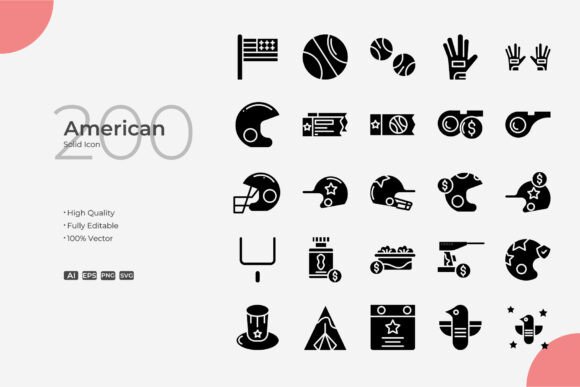
American Solid Icon Collection: 200 Simple, Clean Vector Graphics for Everyday Design Needs
A lot of icon sets try to do too much—overdecorated shapes, mismatched styles, or heavy concepts that conflict with the project they should support. The American Solid collection takes the opposite approach. It gives you 200 straightforward, cleanly crafted vector icons that feel cohesive and adaptable right out of the folder. Each icon is built as a pure vector shape, so there’s no pixelation at any size, and because you receive the actual source files—Adobe Illustrator (.ai), EPS version 10, and SVG—you aren’t locked into a look. You can change stroke weights, adjust colors, or even reshape details in software like Illustrator or CorelDRAW without losing fidelity.
What makes a practical icon set valuable isn’t the number of files, it’s how easily they slide into real workflows. American Solid works because it’s visually quiet. The shapes are solid and balanced, the lines are intentional, and the design stays out of the way of your message. Whether you’re updating a patient portal for a small clinic, printing a rack card for a bakery, or building an interactive e‑learning module, the icons provide a reliable shorthand that your audience understands instantly.
Where These Icons Actually Earn Their Keep
People reach for icon collections during the unglamorous moments of a project—when a wireframe needs visual anchors, when a slide deck feels too text‑heavy, or when a flyer just looks unfinished. That’s where American Solid becomes a quiet problem‑solver.
Websites and Mobile Apps
For a UX designer mapping out a dashboard, icons have to communicate function without adding noise. The 200 icons in this set cover the usual suspects—navigation arrows, search, user profiles, settings, notifications—but they do it with a consistent stroke and proportion that makes a mobile app feel professionally tuned, not assembled from mismatched kits. Because the files are SVG, you can inline them directly into code, style them with CSS, and have them render crisply on retina screens. A small business owner who builds their own Shopify site can drag an SVG from the folder, change the color to match their brand purple, and get an instant visual upgrade without hiring a designer.
When you need to resize an icon for a hero section on a desktop view and the same icon for a tiny hamburger menu on a phone, the vector nature of the set means you do it once and it stays sharp. That alone saves from the “why is this blurry?” back‑and‑forth that eats up a morning.
Print, Flyers, and Promotional Materials
A print designer preparing a concert poster or a church bulletin often faces a problem: the layout needs symbols, but free raster icons turn into fuzzy blobs when blown up. American Solid ships with an EPS file that plays well with professional print workflows. You open the EPS in CorelDRAW or Illustrator, scale a calendar icon to three inches wide for a brochure, and the edges remain as clean as when it was designed. The ability to edit stroke weight means you can match the line thickness of the icon exactly to the typeface of a headline, which is the kind of detail that separates a coherent design from one that looks cobbled together.
Think of a real estate agent who wants a “For Sale” yard sign that looks polished. They can take a house icon from the set, bolden the stroke to 2pt so it reads well from a distance, and export it as part of the sign layout. Or a freelance designer making a restaurant takeout menu can pull fork and knife icons, recolor them to sepia, and instantly give the menu a customized, thoughtful feel.
Books, Guides, and Educational Content
Creators who self‑publish how‑to guides, workbooks, or instructional PDFs need visual cues that don’t distract from the text. A teacher putting together a digital grammar worksheet might use a small pencil icon to mark writing exercises and a lightbulb for tips. The American Solid set offers these universally recognized symbols without the cartoonish look that can undercut a professional document. Since the icons are fully customizable, you can keep the stroke weight thin and elegant for a high‑end e‑book, or thicken it slightly for a low‑vision print version where contrast matters.
An author formatting a paperback on interior design could scatter subtle furniture icons as section dividers. Because the package includes an AI file, they can open it, change the fill to a 15% gray so the icons recede gracefully into the background, and they never have to worry about resolution limits. That kind of control turns a generic icon set into a personal design tool.
Social Media Graphics and Infographics
Content creation moves fast, and the person running a brand’s Instagram account doesn’t have time to search three different libraries just to find matching icons for a carousel post. American Solid’s 200‑icon consistency means you can pull a graph icon for a stats slide, a chat bubble for a testimonial, and a shopping bag for a product launch—and they all look like they belong together. The SVG files import directly into Canva, Figma, or any browser‑based tool that many social media managers prefer. A quick color change to the brand palette and the icons feel custom‑made.
A blogger who wants to illustrate a “10 tips” infographic can number each tip with a circled icon, adjust the stroke to complement their blog’s minimalist aesthetic, and produce a graphic that looks like a design team worked on it—when really it was one person with a well‑chosen icon set and twenty minutes.
Branding and Visual Language Consistency
Small companies that operate across very different channels—a physical shop, a website, a YouTube channel, a printed loyalty card—benefit enormously from a single icon library. When the same set of symbols appears on a mobile app button and a physical store sign, customers subconsciously feel that the brand is put‑together and trustworthy. With American Solid, an entrepreneur can grab the source files, set a master color and stroke profile at the start of a branding project, and then propagate that look into everything from business cards to email signatures. The editable strokes prevent the jarring effect of thick‑lined icons on a delicate business card layout and skinny ones on a bold banner; you simply adjust the thickness to fit the context, while the core shape stays recognizable.
Why Full Vector Control Changes How You Work
Many so‑called “editable” icon sets stop at color changes. The American Solid files give you complete access to the construction of each icon. Because you have the Illustrator file and the EPS version 10, you aren’t just recoloring a flat raster—you can select individual anchor points, delete redundant lines, or combine shapes to create a completely new symbol. If a client asks for a “home” icon with a slightly taller roof, you can edit the vector directly instead of accepting a compromise.
The editable stroke feature is especially practical for print designers who need to respect minimum line thicknesses for different printing techniques. For screen‑printed T‑shirts, you might thicken the stroke to 2.5pt to avoid ink bleed. For an engraved nameplate, you could thin it down to 0.5pt. The set doesn’t force any artistic decisions on you; it’s a starting point for your own refinements.
The high quality design promise isn’t just a marketing phrase. It means the icons are drawn with clean geometry, consistent padding, and optically matched weights. When you place a “phone” icon next to a “mail” icon in a footer, they look like they were made by the same hand. That uniformity translates directly into speed: you spend less time tweaking mismatched proportions and more time completing the actual project.
What to Consider Before Using the American Solid Set
As practical as the collection is, there are a few realistic points to keep in mind so it fits your workflow.
- Software compatibility. The AI and EPS files really shine in vector editing programs like Adobe Illustrator or CorelDRAW. If you only use a simple image editor that can’t open EPS, you’ll still have the SVG versions, but you may not be able to edit stroke properties in the same fine‑grained way. SVG works wonderfully in modern design apps and even text editors, so many users will be covered.
- Style fit. These are solid, clean icons with a contemporary, minimalist feel. If your project demands hand‑drawn, sketchy, or extremely detailed illustrative icons, this set may feel too crisp. That said, its neutrality is its strength for corporate sites, e‑commerce, educational content, and any context where clarity beats decoration.
- Icon coverage. With 200 icons, you get a robust range, but every project has unique symbol needs. Quickly scanning the included set before you start helps you decide if the core symbols you’ll rely on—arrows, devices, weather, common objects—are present. Chances are they are, and because customization is so open, you can often tweak a similar icon into something distinct.
- Licensing and usage. Typically, source file icon sets like this allow both personal and commercial use, but always check the specific license included with your purchase. In most cases, you can embed the icons in websites, apps, and printed materials without attribution, as long as you don’t resell the unmodified files themselves.
How Different Users Make the Set Their Own
One of the clearest signs of a useful resource is how it disappears into the background of very different workdays. A freelance graphic designer might start a brand identity project by opening the AI file, globally applying a client’s palette, and saving out a custom icon sheet within ten minutes. An entrepreneur running a small bakery can drag the SVG of a coffee cup onto their homepage, pick a warm brown fill, and never worry about it looking amateurish. A non‑profit communication lead can use the same heart icon in a direct mail appeal and on a Facebook donation banner, adjusting the stroke weight so it reads equally well in both contexts. A marketing student putting together a portfolio piece can build a mock mobile app with navigation icons that genuinely look production‑ready.
Because the files include the EPS version 10—a widely compatible legacy format—even a small print shop that hasn’t upgraded its prepress software in years can open and process the icons without conversion errors. This kind of practical foresight means you won’t get a frantic email from a printer right before a deadline.
The easy drag and drop nature of the SVGs also lowers the barrier for people who aren’t full‑time designers. A blogger who learned to tweak graphics in a free tool can add an icon, resize it, and change its color through a simple color picker. They don’t need to understand bezier curves to benefit from a perfectly crafted vector shape. The set meets them where they are, while still offering depth for the professional who wants to edit anchor points.
From Editable Source Files to Finished Project
When you have a set that includes the original AI file, you’re not just consuming a final design; you’re gaining a reusable base layer. Over time, you might build a customized version of the American Solid set specific to your brand—colors matched, stroke weight preset, maybe a few icons subtly modified to fit your industry. Because the vectors are infinitely scalable, that investment keeps paying off whether you move from a flyer to a billboard next year or from a mobile app design to a conference backdrop.
The real value of a good icon collection surfaces in the middle of a project when you realize you need one more symbol that matches the others. With the source files open, you can duplicate a similar icon, adjust a path, and create a custom variant that blends perfectly with the rest of the set. That agility means you don’t have to compromise your visual language because a stock library fell short.
Small choices add up. Icons that maintain crisp edges, let you dial in just the right line thickness, and open without drama in your design software of choice remove friction you didn’t even know you were tolerating. That’s where American Solid quietly impresses—not with a single headline feature, but by being the dependable, editable, thoughtfully constructed icon library that doesn’t demand attention to itself.